Install microbetag
microbetag consists of several, independent tools, to allow users to get an annotated co-occurrence network
based on their needs.
Its basic features are the following:
microbetag Cytoscape App called MGG: no matter how you will actually run
microbetag, you will needMGGto visualize the annotated network. Through MGG, you can upload your input data and directly callmicrobetagwhich will run on-the-fly on our server.microbetagwiil first try to map the taxa present on the data to their corresponding GTDB genomes based on their taxonomies. This case is rather straight forward for the user, but it is limited in datasets with less than 1000 taxa.microbetagDB hosted at KU Leuven, it consists of all the pairwise GTDB reference genomes annotations. You can directly access its contents using its corresponding API
microbetag_prepa Docker image that allows you to run only two specific preprocessing steps:in case of 16S rRNA data, you can provide an abundance table with the ASV/OTU on its last column and your data will be taxonomically assigned using a GTDB-oriented 16S reference database.
for datasets with more than 1000 taxa, you can perform the network inference using this image and the
FlashWeavetool. After, you run this pre-process image, you may provide your findings on MGG instead of your original data. This way, you can run the streamiline on-the-fly version ofmicrobetagfor bigger datasets.
microbetagstand-alone tool. This is the most elevated way to accessmicrobetag’s features. It is the one allowing you to move beyond the precalculations of the GTDB reference genomes and themicrobetagDB, and instead, implement our approach on your own genomes, bins/MAGs, genome annotations or even Genome Scale Models.
Where to get what
MGGapp:The app on your Cytoscape
Source code for the app
microbetag_preptool:The tool on DockerHub
microbetagstand alone:The tool on DockerHub
microbetagDB:Key data products on Zenodo
Install MGG Cytoscape
To start using microbetag and/or to visualize microbetag-annotated networks, you need first, to make sure you have Cytoscape on your system; if not, go ahead and download Cytoscape.
Then, you need to install the microbetag app (MGG) from Cytoscape App store.
Make sure you first launch Cytoscape and then visit Cytoscape Appstore.
If you have already visited the MGG page on Cytoscape Appstore, launch Cytoscape and refresh the Cytoscape Appstore page.
You should now see an Install button.
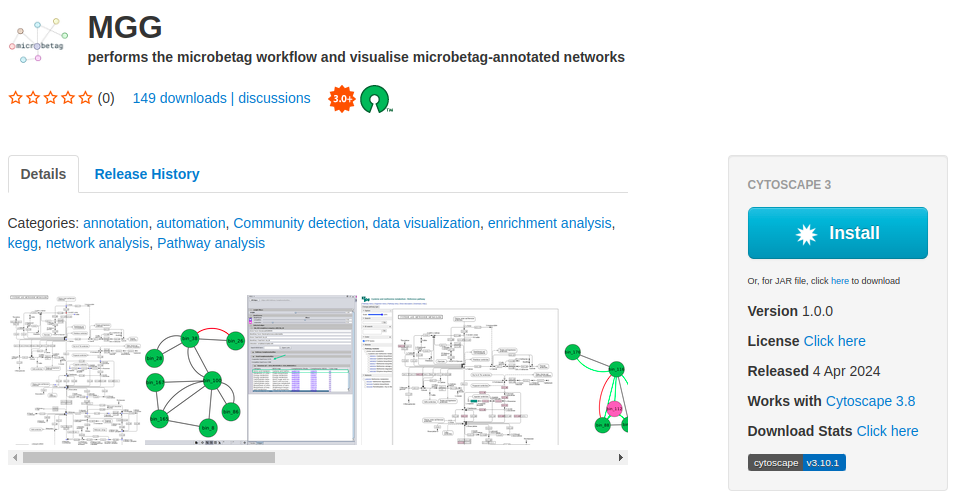
By clicking it, it will be automatically integrated on your Cytoscape.
If you visit Cytoscape Appstore and you have not lunched Cytoscape, you will see a Download button instead of the Install.
As already mentioned, we suggest you lunch Cytoscape and refresh the page.
Otherwise, you can click the Download button and move manually the .jar file to the apps folder of your Cytoscape.
You can also get MGG from within Cytoscape by clicking on the Apps tab of the main bar and then App Store > Show App Store and typing microbetag on the box that pops up.
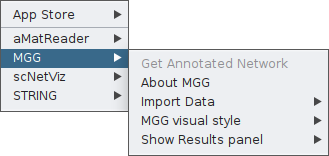
Once the app is installed, you may click on the Apps tab, and you will find MGG there.
Install microbetg_prep tool
The tool
To this end, a Docker/Singularity image is available supporting the taxonomy assignment of the ASVs/OTUs with GTDB taxonomies a taxonomy annotated abundance file with the 16S GTDB (v.207) taxonomies and the creation of the co-occurrence network if asked.
Docker or Singularity needs to be installed.
Then, download the microbetag_prep image either by running:
docker pull hariszaf/microbetag_prep:v1.0.0
or
singularity pull docker://hariszaf/microbetag_prep:v1.0.0
From source code
To install the microbetag stand-alone tool locally, you need first to make sure you have conda or miniconda.
If not already available, you may follow instructions here.
    git clone https://github.com/hariszaf/microbetag.git

    cd microbetag

    bash setup_environment.sh
microbetag and the tools it invokes require a set of dependencies, most of which can be installed at the user level.
However, to enable the RASTtk, there are some Perl requirements that if not already available, they do require to be installed by your admin, i.e. requiring sudo rights.
Also, gdebi is required for installing RASTtk.
Note
The setup_environment.sh script will build two conda environments:
one for running the phenotrex tool alone, called
phendba second for all the rest requirements and the main
microbetagfeatures, calledmicrobetag
The software installed, e.g. Prodigal, HMMER etc, will be installed under your $HOME:
cd
ls .microbetag
/home/my_user/.microbetag
Danger
We have noticed a weird behavior on MacOS when installing phenotrex locally.
In case the setup_environment.sh script fails, you may try to install dependecies required on MacOS for phenotrex based on the error message you get,
and then try to continue the microbetag installation.
Remember to install phenotrex in the phendb conda environment.
Install gurobi license
If you are about to use the stand-alone microbetag tool, you will most probably wish to reconstruct Genome Scale Reconstructions (GENREs) based on your own genomes/bins/MAGs.
To this end, microbetag wraps two widely used approaches:
using
modelseedpythat required RAST annotation of your bins and are based on the ModelSEED resource and identifiers. This can be a rather time-consuming stepusing
carvemethat can be performed in both DNA and protein sequences, make use of the BiGG identifiers and required a Gurobi license (see section GEM reconstruction step)
Both approaches benefit a lot from solvers, such as gurobi; carve actually requires one to run (either Gurobi or CPLEX).
Here is how to get a Gurobi license (for academics):
if you are running
microbetagfrom source codeif you are using the Dockerized version
We found this video (released on 2022) quite helpful on how to get a Gurobi license.
Your license is a gurobi.lic file. To check that your Python can actually use the license, you may run:
    conda activate microbetag
    python
and then
    >>> import gurobipy as gbp
    >>> m = gurobipy.Model()
    Set parameter Username
    Academic license - for non-commercial use only - expires 2025-04-15
.. on a container
When you are using microbetag stand-alone tool as a container, you will need a different kind of Gurobi license,
one called Web License Service (WLS) Gurobi license.
You may find the following link useful on how to do that.
After you get your WLS, it will be again be a gurobi.lic file, you need to mount it on the microbetag container.
For example, assuming you have the gurobi.lic file in the folder you are running the following docker command from:
    docker run --rm -it  \
        --volume=./tests/dev_io_microbetag/:/data \
        --volume=./microbetagDB/ref-dbs/kofam_database/:/microbetag/microbetagDB/ref-dbs/kofam_database/ \
        --volume=gurobi.lic:/opt/gurobi/gurobi.lic:ro \
        --entrypoint /bin/bash  \
        hariszaf/microbetag:v1.0.2
Note that microbetag is looking for the license under /opt/gurobi/.